

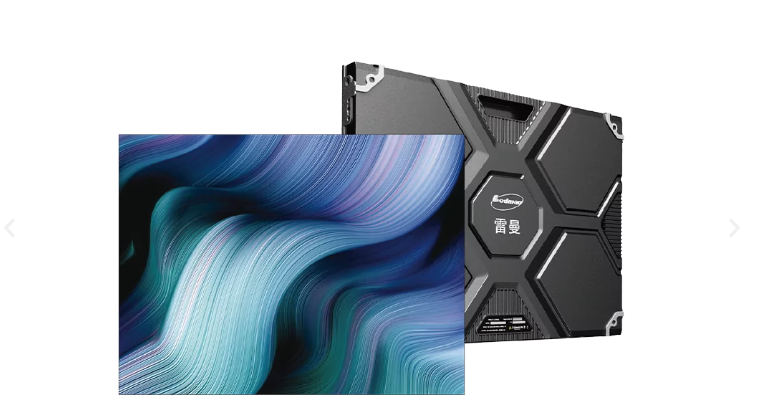
Clear visuals can shape how effectively information is communicated in boardrooms, training rooms, and executive presentation spaces. Choosing the right HD LED display involves more than checking resolution; viewing distance, content type, room dimensions, and AV compatibility all affect the final experience. Since corporate environments often combine presentations, video calls, dashboards, and live data, Ledman provides display options that can be considered within a broader technology-selection framework.
Match Resolution With Viewing Distance
Pixel density becomes increasingly important as viewers move closer to the screen. Fine-pitch configurations can render small text, spreadsheets, charts, and detailed graphics with greater clarity, while larger pitches may be sufficient when the audience sits farther from the display.
Corporate buyers should first identify the nearest seating position before deciding on pixel pitch. Spending more on extremely fine pixel spacing may offer limited practical value if viewers remain several meters away throughout most meetings.
For boardrooms, presentation suites, and executive briefing areas, a high resolution LED panel can be particularly useful when content contains dense information. The objective is not simply maximum pixel density, but a specification that matches the room and the way information is consumed.
Consider Pixel Pitch And Screen Size
Screen dimensions should be considered alongside pixel pitch rather than treated as separate purchasing decisions. Excessive screen size can dominate a smaller meeting room, while insufficient surface area may force viewers to concentrate on tiny details.
Ledman’s KCⅡ Series illustrates this approach with pixel-pitch options ranging from 1.2mm to 2.5mm. Its 3840Hz display specification is designed for smooth visual presentation, while the die-cast aluminum cabinet provides a structured enclosure suitable for fixed indoor installations.
Such flexibility allows corporate projects to select different configurations according to room scale. A compact executive room may require different specifications from a large training center, even if both spaces use the same content platform.
Build The AV Integration Plan
Display quality represents only one part of a corporate AV environment. Signal processors, presentation switches, video conferencing systems, laptops, cameras, Microphones, and network sources may all need to communicate with the display system.
Before purchasing equipment, the AV design should identify every expected input. HDMI, DisplayPort, network-based content, wireless presentation systems, and conferencing platforms can create different signal-management requirements. Mapping those sources in advance reduces the risk of discovering compatibility gaps during installation.
Content switching also deserves attention. A meeting might move from a PowerPoint presentation to a video call and then to a live dashboard within minutes. The selected HD LED display should therefore operate as part of an integrated workflow rather than as an isolated visual device.
Design Content For Corporate Use
Display specifications cannot compensate for poorly structured content. Large screens work best when presentations use readable typography, sufficient contrast, restrained visual density, and layouts that remain understandable from different seating positions.
Charts and dashboards require special consideration because fine details can become difficult to interpret from the rear of the room. Font size, line spacing, chart labels, and color relationships should be tested on the actual display before the system becomes a permanent fixture.
Video content introduces another consideration: frame rate and motion handling. A high resolution LED panel with a 3840Hz refresh rate can be appropriate for environments where presentations include video, animations, or camera feeds, provided the rest of the signal chain supports the intended format.
Plan Installation And Maintenance
Physical installation can affect usability just as much as technical specifications. Wall dimensions, mounting depth, access routes, power distribution, ventilation, and service clearance should be reviewed before equipment arrives.
Corporate facilities also need to consider maintenance access. A display installed in an executive room may have limited opportunities for service because meetings continue throughout the working week. Modular construction and accessible service arrangements can make future maintenance less disruptive.
Power and infrastructure planning should be included in the project documentation. Cable routes, network connections, control equipment, and electrical circuits need clearly defined locations so that the finished installation remains organized and accessible.
Build A Practical Procurement Specification
Purchasing teams can simplify supplier comparisons by creating one consistent technical specification. Pixel pitch, screen dimensions, refresh rate, cabinet construction, processing equipment, input interfaces, mounting requirements, warranty coverage, and commissioning responsibilities should all be documented.
Cost should then be evaluated alongside expected use. A boardroom that displays mostly presentation slides may have different requirements from an operations center showing continuously updated data. Matching technical capability with actual workloads helps prevent unnecessary expenditure.
Corporate buyers considering an HD LED display should also evaluate scalability. Future room expansion, additional signal sources, upgraded conferencing equipment, or changes in content resolution can influence whether the selected system remains practical over several years.
Conclusion
Successful corporate display planning depends on connecting visual performance with the room, content, and AV ecosystem. Resolution needs to reflect viewing distance, while screen dimensions should correspond with audience size and room geometry. Integration planning then brings presentation sources, conferencing tools, processors, and control systems into one coherent workflow.
Selecting the right high resolution LED panel is therefore a specification exercise rather than a simple search for the highest resolution available. With options such as the KCⅡ Series spanning 1.2mm to 2.5mm pixel pitches, Ledman demonstrates how display configurations can be adapted to different corporate environments while keeping attention on practical application requirements.
